Your notes.
No one else’s business.
Ubimate is a powerful, Notion-class rich text outliner workspace that keeps all your data on your device. Block editing, databases, real-time collaboration — all without trusting a server with your content.
macOS & Windows · Free forever · No account required
“The UI is really neat and smooth.”
“It’s easier than Notion.”
Features
Everything you need.
Nothing you don’t.
A full rich text outliner workspace that runs directly on your device — for free.
Cloud collaboration is an opt-in upgrade, not a requirement.
Rich block editor
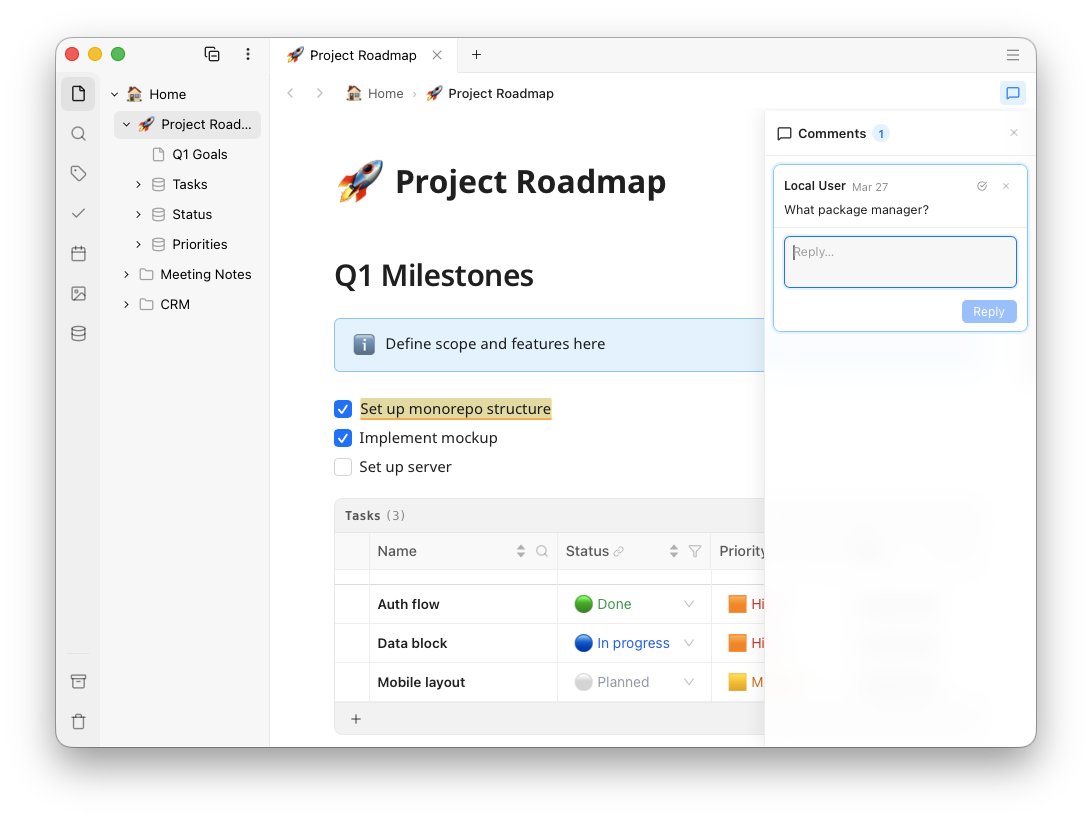
Headings, checklists, callouts, code blocks, multi-column layouts, inline math, diagrams, images, audio, video, bookmarks — all with drag-and-drop reordering and real-time collaboration cursors.
Rich text outliner
Use Ubimate as a rich text outliner to nest any block inside another and build hierarchical outlines. Collapse a parent block to hide its children and keep long documents navigable. Indent with Tab, outdent with Shift+Tab — structure emerges naturally as you write.
Works offline, always
Write, edit, and organize from anywhere — even with no connection. No account is needed for local use, and your changes are ready to sync when you reconnect.
Markdown interoperability
Export any page to clean Markdown at any time and open it in any text editor. Datatable blocks export as CSV. Your data is never locked in a proprietary format.
Inline comments & threads
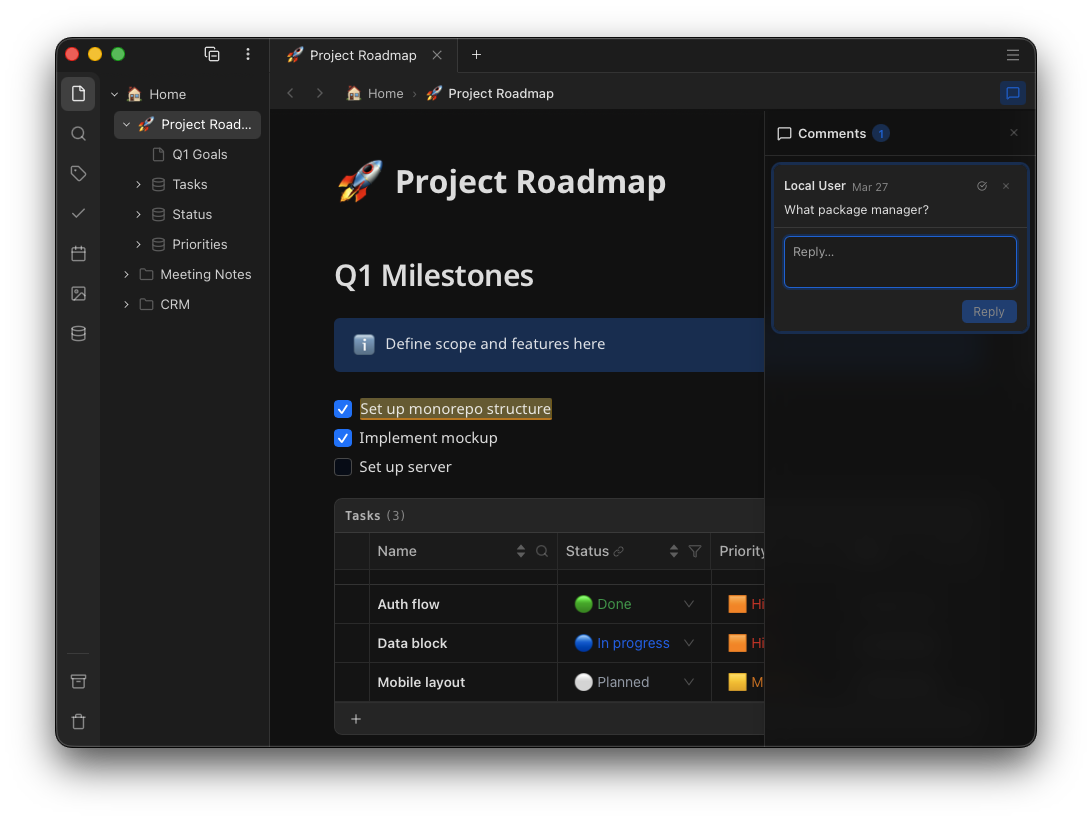
Select any text and start a comment thread. Reply, resolve, or re-open — all visible live to collaborators. Threads are anchored to their text position and sorted by where they appear in the document.
Inline databases
Embed sortable, filterable, paginated tables inside any page. 12+ column types including text, numbers, dates, relations, checkboxes, select, and media attachments.
Calendar, Tasks & Tags
A calendar panel gives a monthly overview of all dated pages. A task panel surfaces every checkbox across your workspace so nothing falls through the cracks. Tags are inline — label ideas within a page, not just the page itself — and filter across your entire knowledge base.
Multi-device sync
Your notes stay in sync across your devices — desktop and web today, mobile soon. Work offline anytime, then reconnect and everything catches up smoothly.
Real-time collaboration
Invite teammates and work together live. See edits, cursors, and comments as they happen, without giving up privacy.
Workspace sharing
Share an entire workspace with teammates or guests. Fine-grained permissions let you control who can view, comment, or edit — with end-to-end encryption maintained throughout.
Total ownership & privacy
Your data stays under your control — archive what matters, export anytime, and move without lock-in. No ad profiles, no behavior tracking, no selling what you write.
Workspace focus mode
Activate only the workspaces relevant right now — inactive ones disappear from the sidebar and search results. Keep work, personal projects, and client spaces cleanly separated without ever archiving or deleting anything.
Why Ubimate
Full power.
Full privacy.
Most knowledge tools make you choose between features and privacy. Ubimate is different.
| ubimate | Notion | Obsidian | |
|---|---|---|---|
| Works 100% offline | ✓ | ✗ | ✓ |
| No account required | ✓ | ✗ | ✓ |
| Zero-knowledge encryption | ✓ | ✗ | ✗ |
| Inline relational databases | ✓ | ✓ | ✗ |
| Rich text outliner (nested blocks) | ✓ | Partial | Plugins |
| Data stays on your device | ✓ | ✗ | ✓ |
| Free forever for local use | ✓ | Limited | ✓ |
| Markdown export | ✓ | Paid | ✓ |
| Calendar, tasks & inline tags | ✓ | Partial | Plugins |
| Workspace focus mode | ✓ | ✗ | ✗ |
| Multi-device sync | Paid plan | ✓ | Paid add-on |
| Workspace sharing | Paid plan | ✓ | Paid add-on |
| Real-time collaboration | Paid plan | ✓ | ✗ |
Privacy-first by design
Your sovereign, permanent workspace
Your workspace should outlive any company. Ubimate gives you long‑term ownership, local export, and a future‑proof data model — because your knowledge deserves permanence.
Private sync is designed so only you and the people you share with can read your content.
Even if a cloud system is compromised, your document contents remain unreadable.
Anti-exploitation privacy. The company structurally cannot turn your data into a product — no behavioural profiling, no monetisation of what you write, no AI training pipelines. Privacy here is enforced by product design, not just policy text.
Your app creates your secure identity locally. Your password is never sent to the cloud.
Your device proves it is you without sending your actual password to the server.
Your account identity stays consistent, so your encrypted workspace remains accessible across devices.
// 1) Create your secure identity on this device
identity = createLocalIdentity(username, password)

// 2) Prove identity without sharing password
session = signInWithDeviceProof(identity)

// 3) Encrypt before cloud sync
encryptedDoc = encryptOnDevice(document)
upload(encryptedDoc)

// Cloud stores unreadable encrypted data.
// Plain content stays private to you and collaborators.
Pricing
Start free. Scale when you need to.
The desktop app is free forever. Pay only if you want cloud sync and collaboration.
Start with Local or Personal today. Pro is currently in early-access rollout.
Available today
The full Ubimate experience, entirely on your device. Free forever, no account required.
- Unlimited pages & databases
- Full rich-text editor with outlining
- Media, Tables, Charts, Diagrams
- Databases, Relations
- Works 100% offline
- Markdown export / import
or €49.90 / year 2 months free
Waitlist open
Your notes, encrypted and synced across all your devices. Zero-knowledge sync — private even from us.
- Everything in Local
- Multi-device cloud sync
- Zero-knowledge encryption
- 15 GB encrypted cloud storage
- Desktop + Web access
Launching Q2 2026 — join the waitlist for 1 month free at launch.
or €99.90 / year 2 months free
Early-access waitlist
For freelancers and power users who need more space and the ability to share privately with clients.
- Everything in Personal
- Per-client workspaces
- 5 guests per workspace
- Guest access controls
- 50 GB encrypted cloud storage
Launching Q3 2026 — join the waitlist for 2 months free at launch.
Trust signal: local mode works with no account, and this site uses privacy-friendly analytics with no cookies. Implementation details are publicly documented in our whitepaper and security page.
Advanced: enterprise deployment options are planned for teams with custom requirements.
FAQ
Common questions
Can I really use Ubimate without ever creating an account?
Yes. The desktop app runs fully on your device — no server, no account, no network required. You can install and use it entirely offline. An account is only required if you want multi-device sync or real-time collaboration.
How does zero-knowledge encryption work?
Your encryption keys are derived locally from your username and password. They never leave your device. When syncing to the cloud, your documents are encrypted before they leave your machine. The server stores only encrypted blobs and your public key — it has no way to read your content.
Is Ubimate a rich text outliner?
Yes. Ubimate works as a rich text outliner and text outliner: you can nest blocks, create hierarchical outlines, and collapse or expand sections while keeping full rich-text editing.
What are my privacy guarantees?
First and foremost: Ubimate is designed so the server cannot access your readable content, even if we wanted to.
We are based in the EU, so users benefit from EU data-protection rights, including:
- Right of access to your personal data
- Right to rectification of inaccurate data
- Right to erasure ("right to be forgotten")
- Right to data portability
- Right to object to or restrict processing
- Right to lodge a complaint with a supervisory authority
What happens if I forget my password?
If you forget your cloud password, you can reset it and start syncing again from your local device.
Your local data stays intact. Your notes and databases remain available on your device, and after resetting your password Ubimate can re-sync that local copy so your other devices catch up again.
What happens if I don’t renew my subscription?
Your content is not lost.
If you don’t renew, cloud sync and paid collaboration features stop, but you can keep using Ubimate locally on your device and export your data any time. There is no lock-in.
How do synchronization and collaboration work if the server can’t read my data?
Conflict-free Replicated Data Types (CRDTs) — specifically the Yjs library — let multiple clients merge edits without a central coordinator that understands the content. The server relays encrypted Yjs update blobs between peers. It never needs to parse or understand the content to provide convergence.
Collaboration is secured with per-workspace client-side key pairs. Keys are exchanged directly between clients as encrypted envelopes, so the server never has access to plaintext key material — enabling end-to-end encrypted, zero-knowledge, real-time collaboration.
What platforms does Ubimate support?
Ubimate is available as a desktop app (macOS, Windows) and a web app for paid subscribers. A mobile app (iOS, Android — coming soon) is in development. All apps are built on the same local-first, privacy-first architecture. The web app doesn’t store data locally (running decryption entirely in temporary browser memory), so it can be used on untrusted machines.
Can I export my data?
Yes. Pages can be exported to clean Markdown files at any time. Datatable blocks export as CSV. You own your data and can move it any time — no lock-in.
Start writing. No sign-up required.
Download the desktop app and get started in under a minute. Your content stays on your machine, private by default.
Available for macOS and Windows · v1.0 Open Beta